
TL;DR
AI can now answer most online test questions in seconds. This guide shows employers how candidates use AI on hiring tests, how to design tests that resist it, which signals reveal it, and how to respond without treating honest candidates unfairly.
Why this matters now
You detect AI cheating in an online hiring test by combining three things: test design that makes AI help impractical, integrity signals recorded during the test, and a person who reviews that evidence before any decision. No single tool does it alone.
A few years ago, a strong online test score was a reasonable sign of skill. Today, a candidate can copy a question into a chatbot and paste back a correct answer in seconds. Some tools can even suggest answers on screen during a live test.
That does not mean every candidate is cheating. Most are not. But if your test is untimed and every candidate sees the same questions, you cannot tell the difference between real skill and borrowed answers. This guide shows you how.
How candidates use AI on online tests
Most AI cheating falls into a handful of methods. Knowing them tells you where to focus.
| Method | How it works | How visible it is |
|---|---|---|
| Copy and paste into a chatbot | The question is copied into an AI tool and the answer pasted back | Usually visible: leaves paste and focus events |
| Screenshot or phone photo | The screen is captured and sent to an AI tool that reads images | Partly visible: slow, often shows as long pauses |
| Browser extension | An add-on reads the page and suggests answers | Partly visible: text can appear without typing |
| Overlay "interview copilot" tools | Software shows answers over the screen | Hard to see from a browser |
| Second device | A phone next to the screen is used to look things up | Hard to see from a browser |
| Impersonation | Someone else takes the test | Visible with webcam checks |
The first three leave traces inside the browser. The last three mostly do not. That is why detection alone is never enough.
Step 1: Prevent it with test design
The cheapest and fairest way to stop AI cheating is a test where using AI takes longer than answering. Five design choices do most of the work.
- Time each question, not just the test. A limit of 45 to 90 seconds on a reasoning question leaves time to think, but not to copy it into a chatbot and wait for a reply.
- Give every candidate a different test. Draw questions from a pool several times larger than the test, in a random order. Shared or leaked answers stop working.
- Serve one question at a time from the server. If the whole test loads in the browser, it can be captured in one go. Answer keys should never reach the candidate's device.
- Use formats chatbots struggle with. Picture-based puzzles, ordering tasks, spreadsheet cells and listening clips are slow to pass to AI within a timer.
- Ask candidates to do, not describe. Typing a formula into a live cell proves more than picking the right formula from a list.
If you only change one thing, add per-question timers. Untimed tests with the same questions for everyone are the easiest to game.
Step 2: Detect it with integrity signals
Prevention stops most help. Signals recorded during the test make the rest visible. Each one is a clue, not proof.
| Signal | What it can suggest | Possible innocent reason |
|---|---|---|
| Tab switch or window change | Looking something up | A notification or a dropped connection |
| Paste into a text answer | Text written somewhere else | Pasting from their own notes, where allowed |
| Text that appears without typing | A tool or extension inserting text | Some dictation or autofill tools |
| Correct answer faster than reading time | Answer supplied from outside | A very quick candidate on an easy item |
| Very uniform answer times | Answers copied, not worked out | Rare, but possible on a short test |
| Webcam: no face or a second face | Away from the screen, or a helper | Poor lighting, or family walking past |
| Same device or network as another candidate | Shared answers or one person testing for several | A shared office or home Wi-Fi |
Look for patterns, not single events. One tab switch in a 30-minute test means little. A tab switch, then a paste, then a fast correct answer, repeated across several questions, means a lot more.
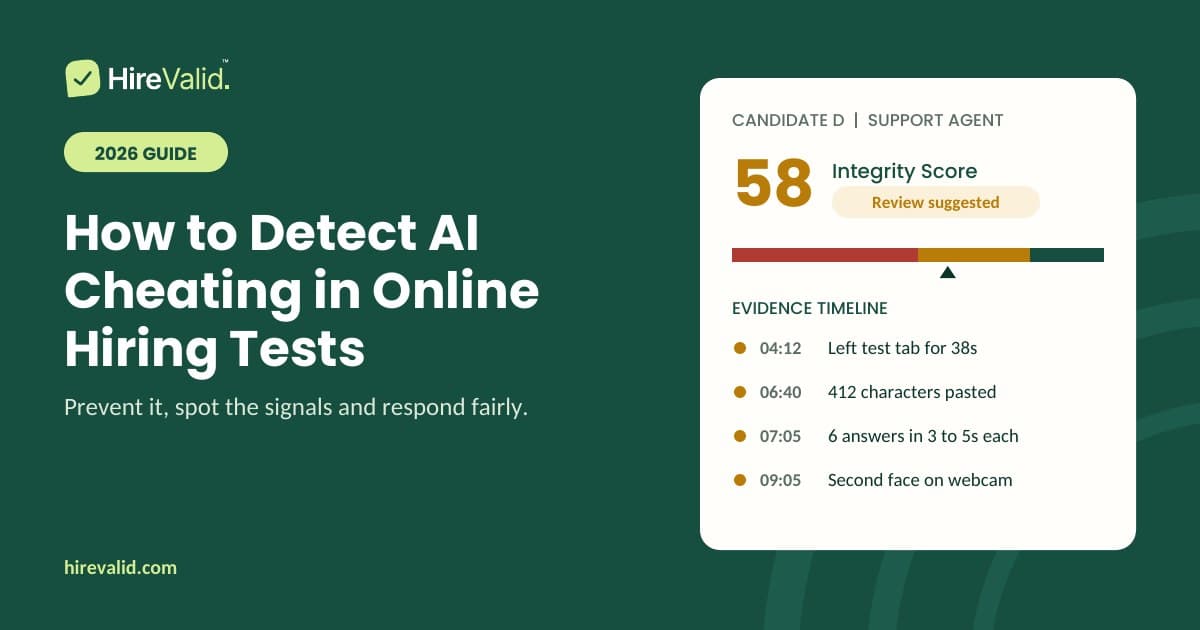
Tools like HireValid combine these signals into an Integrity Score from 0 to 100, with a timeline of what happened and when, so you can review the evidence in a minute instead of reading raw logs.
One caution: AI-text detectors are not reliable enough to judge a candidate on their own. Research has found they can flag writing by non-native English speakers as AI-generated. Treat them as a weak signal at most.
What no online test can detect
Being honest about the limits is part of a fair process. A browser cannot see a phone on the desk, a helper sitting off camera, or an overlay tool running outside the browser.
You do not need to detect everything. You need a process where outside help rarely pays off:
- Tight timers make slow help, like typing a question into a phone, useless.
- Webcam snapshots, with consent, show when someone else is present.
- A short interview follow-up confirms the rest. Ask each shortlisted candidate to talk through one or two of their test answers. Someone who solved the problem can explain it.
Be wary of any vendor that promises tests that are "completely cheat-proof". Ask what their system cannot see. A clear answer is a sign you can trust the rest.
Step 3: Respond to a flag fairly
A flag is a reason to look, not a reason to reject. How you respond protects honest candidates and your employer brand.
- Read the evidence. What happened, when and how often?
- Check for an innocent explanation. Accommodations, assistive tools and shared networks can all trigger signals.
- Ask neutrally. Describe what you saw, not what you suspect.
- Offer a short supervised retest on a video call if doubt remains.
- Decide yourself. Never reject a candidate automatically on a signal alone.
A message you can adapt:
"Thanks for completing the assessment. Our system recorded some activity we'd like to understand, including time spent outside the test window. This sometimes has a simple explanation. Could you tell us what happened? We'd also be happy to set up a short follow-up test on a video call."
Also tell candidates up front what is monitored and why. Clear rules make every later judgment fairer, and in many places, webcam images need explicit consent.
Your AI cheating checklist
- ☐ Every question is timed by the server, with fair reading time
- ☐ Each candidate gets a different set and order of questions
- ☐ The test includes visual or interactive items, not only text
- ☐ Tab switches, pastes and answer timing are recorded
- ☐ Candidates are told what is checked, and consent to camera use
- ☐ Flags are reviewed by a person, never acted on automatically
- ☐ Shortlisted candidates explain one test answer in the interview
Frequently asked questions
Can candidates use ChatGPT on pre-employment tests? They can try. Timed questions, unique question sets and visual items make it slow and impractical, and integrity signals make it visible when it happens. No online test can rule it out completely.
Can you tell if a test answer was written by AI? Not reliably from the text alone. It is more useful to know whether the text was typed during the test or pasted in.
Should I reject a candidate whose test is flagged? No, not automatically. Review the evidence, ask the candidate, and offer a retest if it is unclear.
Is it legal to monitor candidates during a test? In many places, yes, with clear notice and consent. Rules on webcam and biometric data vary by region, so check with an employment lawyer.
Try it on your next role
HireValid is built to catch AI assistance. Every test is timed question by question, unique to each candidate, and comes with an Integrity Score and the evidence behind it. Plans are monthly, with no annual contract.
Start free at app.hirevalid.com
Does a low Integrity Score reject a candidate?+
No. Integrity signals may have innocent explanations, including connection issues or accessibility needs. A person should review the evidence and speak with the candidate before deciding.
What will candidates need?+
A browser and a reliable connection. Typing, spreadsheets and code tasks are intended for desktop. If an employer enables camera checks, candidates must receive a clear notice and a route to request an alternative.
Are the scores official qualifications?+
No. These are tools for hiring decisions. English results are CEFR-aligned level estimates, not official certificates. Cognitive scores are not clinical IQ results.